Good to know
Simplify your payment processing with Fusion Pay integration
Important
Please read all sections thoroughly to understand the documentation.
This documentation will guide you through integrating Fusion Pay APIs into your e-commerce website and/or mobile application.
Prerequisites
Money Fusion Enterprise Account
Your information, entered during account creation, serves as your digital reference within Money Fusion systems. We use this information to identify your account and the applications you create.
This information is necessary for verification purposes.
Getting Started
Account Setup
- Ensure you have a Money Fusion account
- Create one if needed
Account Access
Click on "API de paiement" in the left menu
Application Creation
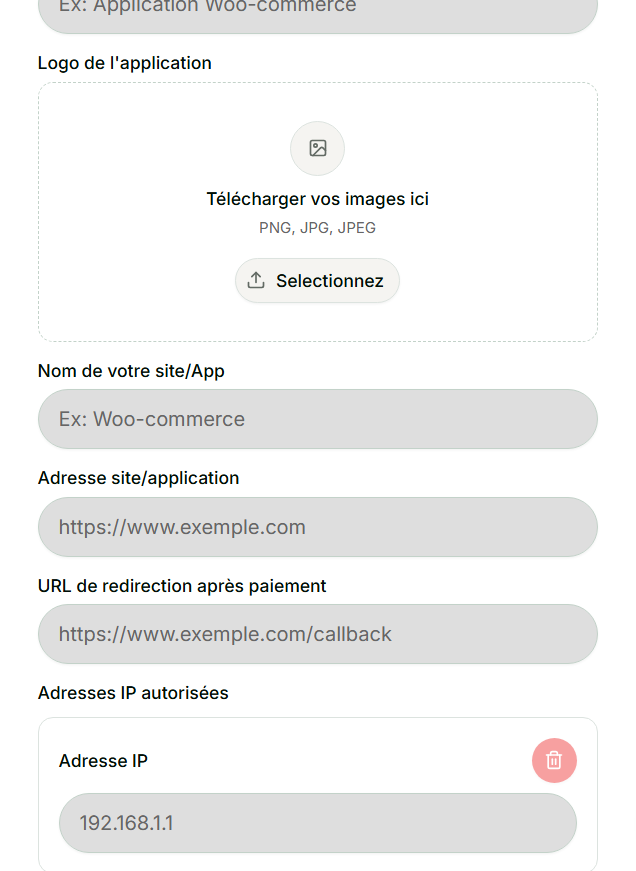
Once you create an application, an API link will be generated that can be implemented across multiple sites and applications.
Mandatory Security Rules
- The website URL must be valid and publicly accessible.
- The callback_url (optional). The redirect URL after payment, if provided, must belong to the main domain or an authorized subdomain.
- Only registered IP addresses will be allowed to access the API.
- Any undeclared IP will be automatically blocked.
Practical Tip
If you attempt a payment from an unauthorized IP, you will receive the following message:
Unauthorized IP or unapproved application (xxx.198.xx.252)
The IP shown in parentheses is the one you must register in your Fusion Pay application.
Next Steps
You can now start using your API link for integration.
Note
Detailed integration procedures will be covered in subsequent sections.